Buscar en Mind w/o Soul

viernes, diciembre 05, 2008

Libro online sobre diseño

[Beta] How do you design?
How do you design?

Hugh Dubberly

* Mar 18, 2005
* 4 Comments
* Download PDF

This book is not finished. We’ve been developing it over the past few years. It began as a manilla folder with copies of different process models. We completed the first “book” version as part of a project undertaken for Elaine Coleman and Sun’s Virtual Center for Innovation. We present this version for educational purposes only. We have obtained no permissions to reproduce any of the models. Copyrights remain with their owners.

lunes, noviembre 17, 2008

Recetas de suflé

o Soufflé, como lo escriben los finos :-)
Uno dulce, otro salado y otro de queso.

Soufflé de Grand Marnier/Coraçao
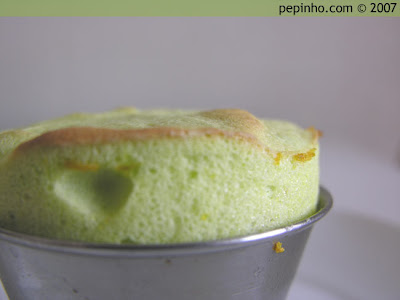
  • 286 ml de leche [143 ml]
  • Ralladura de ½ de naranja [¼]
  • 14 gr. de harina [7 gr.]
  • 14 gr. de maicena [7 gr.]
  • 14 gr. de mantequilla [7 gr.]
  • 4 yemas de huevo [2]
  • 4 claras de huevo [2]
  • 86 gr. de azúcar [43 gr.]
  • 30 ml. de Grand Marnier o Curaçao [15 ml]
(1) Calentamos la leche, la harina y la maicena batiendo constantemente. Hervimos durante 2 minutos.

(2) Retiramos del fuego, añadimos la mantequilla, el licor, la ralladura y las yemas. Removemos continuamente hasta que espese. Dejamos templar.

(3) Levantamos las claras a punto de nieve añadiendo el azúcar en dos tandas.

(4) Con ayuda de una espátula echamos las claras montadas sobre la masa con cuidado y de forma envolvente.

(5) Engrasamos los moldes con mantequilla, ralladura de naranja y azúcar. Rellenamos los moldes dejando un espacio hasta el borde con el soufflé.

(6) Hornear a 200º en horno precalentado por arriba y abajo durante unos 15-20 minutos o hasta obtener un tono dorado. Al final podemos bajar un poco la temperatura, para que se hagan también por dentro.

Si se bajan, pueden introducirse unos segundos, 5 ó 10, no más, cuidando de que no exploten.
Se toman calientes.
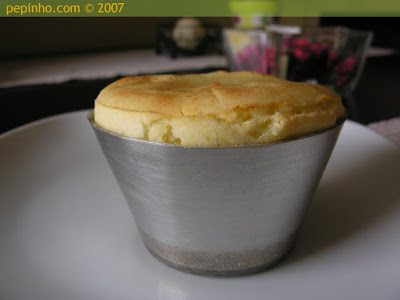


Soufflé de (puré de) patata

Ingredientes
  • 2 yemas de huevo
  • 3 claras
  • 300-350 gr. de patata cocida y pelada
  • Sal
  • 40 gr. de mantequilla derretida
  • 80 ml. de nata para montar
  • 50 gr. de parmesano, Grana Pagano
  • 80 gr. de queso crema
  • Pimienta y nuez moscada
Para el molde
  • Mantequilla, ralladura de naranja y azúcar
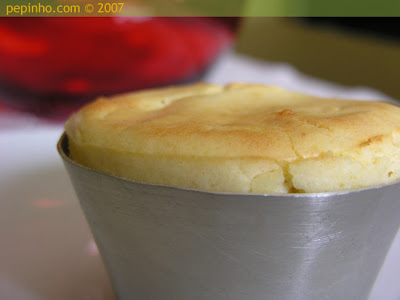
(1) Cocinar las patatas en agua con sal durante unos 20 minutos, hasta que estén cocinadas, escurrimos y hacemos un puré, todavía calientes. Añadimos la nata, la mantequilla, las yemas, los quesos, rectificamos la sal, y añadimos pimienta y nuez moscada a gusto.

(2) Preparamos un molde (taza) con mantequilla y espolvoreamos con pan rallado.

(3) Levantamos las claras con un chorrito de aceite hasta que queden bien montadas y echamos de forma envolvente sobre el puré. Una vez mezclado introducimos en los moldes.

(4) Ponemos en el horno al baño María durante unos 25 min. a unos 190ºC. No debemos abrir el horno mientras se hornea para evitar que se baje. Retiramos cuando tenga un tono marrón dorado.

Se toma caliente.

De queso:

souffle

Este soufflé tiene historia. Si quieres leerla, aunque sea hacerme un poco de publicidad (y por qué no voy a hacérmela), pasa por aquí, que es donde la cuento. ;)

Atento a los ingredientes y los tiempos, que son imprescindibles para que salga perfecto.

Necesitamos:
* 100 gramos de queso emmental rallado
* 30 gramos de queso manchego rallado
* 70 gramos de mantequilla
* 40 gramos de harina
* 4 vasitos de leche
* 4 huevos
* una pizca de nuez moscada
* sal
* pimienta

Y lo hacemos así:
Se funden 60 gramos de mantequilla en una cazuela, a la que se agrega la harina y se mezcla bien, con una cuchara de madera, para que no se formen grumos. Cuando esté ligeramente dorada, no dejes que se queme, se incorpora lentamente la leche caliente, sin dejar de remover. Se salpimenta, se aromatiza con nuez moscada recién rallada y se cuece a fuego lento durante unos diez minutos, sin dejar de remover. Ha de quedar una bechamel finísima.
Se retira del fuego y se añade el queso emmental, se mezcla bien y se deja templar.
Se separan las yemas de las claras y se añaden las yemas a la bechamel, que ya no estará caliente, mezclando de nuevo. Las claras se montan a punto de nieve bien firme (puesdes conseguirlo poniendo una pizquita de sal antes de comenzar a batir) y se van añadiendo a la bechamel con queso, con mucho cuidado, poco a poco, con movimientos envolventes para que no se bajen. Este paso es el más delicado, así que procura hacerlo con mucho mimo.
Unta un molde para soufflé con el resto de la mantequilla y espolvoréalo con el queso manchego rallado. Rellénalo con la bechamel que ya está terminada y cuécelo en el horno precalentado a 200º unos treinta minutos; muy importante: no debes abrir el horno durante la cocción.
En cuanto lo apagues, saca el soufflé y sírvelo caliente. Puedes complementarlo con una ensalada.


domingo, noviembre 16, 2008

Receta de migas gachas

screen.width-200){ this.height = Math.round(((screen.width-200)/this.width)*this.height); this.width = (screen.width-200); }" border="0">
Gachas migas

Las gachas migas se hacen (para 2) poniendo en la sartén 150 ml aproximadamente de agua y 100 de cerveza. Cuando empieza a hervir, se echa 250 g de harina, un poco de aceite y la sal, y a darle golpes y moverlas hasta que se vallan separando en bolitas. mientras se fríe el acompañamiento: morcilla, longaniza... yo suelo freir también mucha cebolla, el punto dulzón nos gusta mucho. El aceitillo usado se echa cuando ya van estando casi listas, y se apartan cuando estén hechas (que no esté la masa muy pegajosa al comerla). Mi marido es el que la mueve, cansa mucho.

miércoles, noviembre 12, 2008

Fotos de stock

Stock Photography: Search Royalty Free Images & Photos
iStockphoto is the internet’s original member-generated image and design community. Find your inspiration on the world's leading royalty-free stock destination. Search for over 3 million photographs, vector illustrations, video footage and Flash files. Buy

Welcome to Stock.XCHNG,
the leading FREE stock photo site!

Whether you just want to browse our huge image gallery or want to share your own photos with others, this is the site for you!stock or sell stock — or both.

Design PERSONAs in Gnome

Arquetipos de diseño para el free desktop Gnome:

http://live.gnome.org/GnomeWeb/WebPersonas

There has been a lot of talk over the years of
trying to understand just "who" our users are. Personas are a classic
way of capturing user information.


Describe your Idea/Solution


There are a few personas already created for various projects. This page serves a few purposes:

  • Collect links to existing personas or attempts at creating Gnome personas
  • Documenting ideas for using personas, including how to get buy-in from downstream stakeholders
  • Discussion of challenges to using and creating personas.

Powerpoint - presentaciones y discursos

Presentaciones eficaces y estructura

Rands In Repose: Out Loud
In his autobiography, regarding his stand-up comedy years, Steve Martin writes, “If you don’t dim the lights… the audience won’t laugh.” This subtle, paradoxical observation is the core difference between speeches and presentations. In a presentation, half of the art is figuring out how to create an environment where your audience can actively participate without knowing they are participating. In a speech, the audience may laugh or cry, but they are not required nor encouraged to participate, because, during a speech, the spotlight never leaves the speechmaker.

For a presentation or a speech, you need your audience, otherwise it’s just you in an empty room talking to no one in particular, and we already have a word for that… it’s called writing

sábado, noviembre 08, 2008

HOW TO install cdrecords in Ubuntu Hardy

Instead of cdrkit:

This has been an interesting debugging journey. The cdrkit tools (wodim, et al) on Hardy have bugs that don't show up until later and, in my case, if I hadn't had an XP system to test on, would have resulted in a huge waste of time, energy, money, and good will. And, the bugs have been known for quite some time and have not been addressed in Hardy. I don't trust cdrkit any more. I understand that there are strong personalities involved and licensing subtleties that matter to distribution support. However, for my personal use, I just really couldn't care less about any of that.

Bottom line, I need for the tools to work reliably; cdrkit doesn't, cdrtools does. If there are licensing issues, well, that's what the "free nonfree" good/bad/ugly repositories are all about, right? I'm marginally Linux-competent, enough to get cdrtools working, with your guidance. What about the poor Windows user trying out Ubuntu for the first time?


# Open a terminal window (Konsole in Kubuntu) and enter
# the following commands

# Make sure you're in the home folder
cd ~

# Make a working folder and change to it
mkdir cdrtools
cd cdrtools

# Download latest cdrtools from http://cdrecord.berlios.de/private/linux-dist.html
wget ftp://ftp.berlios.de/pub/cdrecord/alpha/cdrtools-beta.tar.gz

# Unpack
tar xzf cdrtools-beta.tar.gz

# CD to the directory cdrtools is in.
cd cdrtools-2.01.01

# Compile and install
sudo make
sudo make install
sudo make clean

# Files are installed to /opt/schily
# (you may want to change their ownership to root:root)
sudo chown root:root /opt/schily/bin/*

# Move the following files (some will be links) from /usr/bin to a junk folder...
sudo mkdir /opt/schily/replacedfiles
sudo mv /usr/bin/cdrecord /opt/schily/replacedfiles
sudo mv /usr/bin/genisoimage /opt/schily/replacedfiles
sudo mv /usr/bin/mkisofs /opt/schily/replacedfiles
sudo mv /usr/bin/readom /opt/schily/replacedfiles
sudo mv /usr/bin/wodim /opt/schily/replacedfiles

# Create links:
sudo ln -s /opt/schily/bin/cdrecord /usr/bin/cdrecord
sudo ln -s /opt/schily/bin/mkisofs /usr/bin/genisoimage
sudo ln -s /opt/schily/bin/mkisofs /usr/bin/mkisofs
# Is the following correct (is readcd a version of readom??)
sudo ln -s /opt/schily/bin/readcd /usr/bin/readom
sudo ln -s /opt/schily/bin/cdrecord /usr/bin/wodim
sudo ln -s /opt/schily/bin/readcd /usr/bin/readcd
sudo ln -s /opt/schily/bin/mkhybrid /usr/bin/mkhybrid
sudo ln -s /opt/schily/bin/cdda2wav /usr/bin/cdda2wav

# Remove working folder
cd ~
sudo rm -r cdrtools

viernes, noviembre 07, 2008

Hoja de cálculo con Python

El sucesor de Excel. Una hoja de cálculo programable con lenguaje Python integrado.

Resolver Systems Ltd
You've reached the limits of what you can do with formulae in your spreadsheet. Until now, the only way to go forward was to use macros and scripting - which never works out well. Using Resolver One, there's a better way - a blend of a spreadsheet interface with the powerful Python programming language, giving you the right tool for complex analysis.

Monad transformers en Haskell

Tutorial de para qué sirven los transformadores de mónadas

A Neighborhood of Infinity: Grok Haskell Monad Transformers
I've tried a few times to read various documents on the web about
Monad Transformers in Haskell. I think that in almost every case the
authors are trying to show how clever they are rather than explaining
their use. If I had just seen the simplest possible examples of Monad
Transformers at work I would have been able to figure out what was going
on and that would have given me enough information to bootstrap myself
into Monad Transforming enlightenment.

So to save other people the trouble I went through I'm providing you
with examples of Monad Transformers at work. I'm not even going to
explain in detail how they work, they're close to self-evident once the
main features are pointed out.


También: plan de estudio para Haskell http://metacircular.wordpress.com/2007/03/05/a-haskell-study-plan/

jueves, noviembre 06, 2008

Interactive Fiction tutorial

Guia para escoger los juegos más interesantes

A Beginner's Guide to Playing Interactive Fiction
This site is a quick start guide, designed to help people who want to try interactive fiction, or as it is also called, text adventures. It is divided up into seven steps, which can all be seen in the table to the left. Reading through all the material on this site takes about 10-20 minutes, and that's all the preparation you'll need before you can start downloading and playing games.

miércoles, octubre 29, 2008

Extensión firefox: Drag & Drop zones - gestos

Gestos mediante menú translúcido

Drag & DropZones :: Firefox Add-ons


Drag & DropZones 1.2.3
by Captain Caveman

Categories

* Search Tools
* Appearance

Get rid of that clumsy context menu, and search the web using up to 64 stylish Drag & DropZones

martes, octubre 28, 2008

The Automation WWW

Information technologies have two sides to their popularity:
- they are novel communication channels
- they allow for automation of repetitive tasks (either simple or complex)

While both have been used since the conception of electricity as a controlling signal, it's the arrival of the World Wide Web in the 90's that has really made clear to the general population the implications of information as a technological product.

The WWW primarily exploits the communication side of ITs, though. It still remains to be seen a similar popular-culture event that equally conveys the implications of the automation possibilities. People typically fail to grasp the impact that a massive mechanization of information tasks can have on society.

The only topics close to popular awareness are email spam and computer viruses/malware, but unfortunately the general population don't understand the inner workings of those phenomena; they only feel their nastiness, but not the reason why they are so prevalent.

When a mechanism appears that allows people to easily take advantage of computer automation, we'll see a second transformation of the Internet in a similar scale of what happened when the Web arrived. "Web 2.0" is on the right path with its focus on widgets and web-apps, but so far the most popular automatisms in this class are those that provide automatic notification to a group of acquaintances in the social relations graph (Facebook, Tweeter).

domingo, septiembre 28, 2008

Convertir juego de caracteres de ficheros

Y Para lanzarlos desde el menú contextual de nautilus: nautilus-actions.

Charset linux ubuntu HOWTO

convmv, konwert, iconv

convmv converts filenames (not file content), directories, and even whole filesystems to a different encoding. This comes in very handy if, for example, one switches from an 8-bit locale to an UTF-8 locale or changes charsets on Samba servers. It has some smart features: it automagically recognises if a file is already UTF-8 encoded (thus partly converted filesystems can be fully moved to UTF-8) and it also takes care of symlinks. Additionally, it is able to convert from normalization form C (UTF-8 NFC) to NFD and vice-versa. This is important for interoperability with Mac OS X, for example, which uses NFD, while Linux and most other Unixes use NFC. Though it's primary written to convert from/to UTF-8 it can also be used with almost any other charset encoding. Convmv can also be used for case conversion from upper to lower case and vice versa with virtually any charset. Note that this is a command line tool which requires at least Perl version 5.8.0.

martes, septiembre 23, 2008

Principios del javascript

Consejos de expertos profesionales
10 Essential Principles of the Javascript Masters - NETTUTS
JavaScript is one of the most widely used languages in web development. It's simple, yet very powerful, and the number of ways that it can be used are almost limitless. That's why it's so important to gather advice from those who have gone before you. Here are 10 tips from well-respected web developers within the JavaScript community.

lunes, septiembre 15, 2008

HOWTO: Memoria virtual en la Nokia Internet Tablet

En la N800 y la N810:

The Swaporific N810 | kdedevelopers.org
I only discovered today that the n810 doesn't have any swap file turned on by default. It has only 128Mb of memory, which is quite easy to fill up. And when you fill up the memory you don't get a 'consumer friendly dialog' telling you that your machine is full. No instead of anything helpful, the machine will behave slowly, erratically and then ultimately crash. And after is has crashed you will often find that it won't boot anymore and you need to restore your root partition from a backup.

miércoles, septiembre 10, 2008

HOWTO crear dinero

Como se crea el dinero | Todos los COMO
Esta pelicula es lo mejor que encontre para entender como se produce el dinero.

Ideal para los alumnos de la escuelas primarias, es muy didactico, ya que explica el funcionamiento de los bancos centrales, el interes, la deuda, y demases temas relacionados con las finanzas.

miércoles, septiembre 03, 2008

Presentaciones de PowerPoint excelentes

Vídeos de cómo hacer buenos .ppt

Presentation Zen: PowerPoint: sometimes you have to laugh to keep from crying

PowerPoint as pure comedy gold
Below are a few examples of presenters using PowerPoint to help illustrate their messages. In each case the tool actually enhanced the presenter's ability to make a connection with the audience and drive their messages home. The first two presentations are by Don McMillan. Don is a former engineer with a Masters degree in Electrical Engineering from Stanford. He gives some good advice on using the PowerPoint tool properly.

lunes, septiembre 01, 2008

Libro sobre creatividad

Problem solving
The Universal Traveler: A Soft ... - Google Book Search
This unique book will open your eyes to effective and stimulating formulas for solving problems. Discover how techniques developed in specialized disciplines can be applied to almost any business, social, or personal situation.
Table of Contents


Comentario en la lista HCI:

I'd like to add to the discussion about solo ideation by framing of it as a dialog with ourselves. We want to get dialog of ideas flowing and keep them flowing. Here are some points of practice that I have found very useful:

1. Set up a defined time for the session. We want to challenge ourselves to think by different rules for a while because we're going to set aside our dominant analytical and critical thinking abilities and open up the wild side of imagination. So we give our critical side the assurance that we're going to play by these rules for only 20 or 30 minutes, then the critical function can come back in.

2. Keep the critical thinking function out of the room during the session. This is another way of thinking about Osborn's "defer judgement" principle, and it's fundamental to this kind of ideation. Without this principle, we end up driving with our foot on the brake. What it means in practice is that we want to entertain not only the wild, weird and improbable, but also the dumb, mundane, copycat, and obvious ideas. Let everything and anything come out. We want flow, and sometimes the best way to start the flow is with the most obvious solutions. Get them out and see what's behind them.

3. Get the ideas into the room. It's hard to have a constructive dialog with ourselves if it all takes place inside our head. Thoughts are ephemeral, and to really respond and build on an idea we need to make it persistent. Write things on postits or whiteboard, or slips of paper on the table, or anything that captures the ephemeral thoughts. Get them out of our head and into the room. This makes way for new thoughts and creates artifacts that we can sort, cluster, combine, etc., to see patterns and relationships, as well as reconsider and reflect on.

4. Be visual. It really helps to make some kind of visual sketch or notation for an idea as we create it. The process is more natural when we're brainstorming about physical objects, but don't be blocked by the notion that "there's no way to represent this idea...." Find a way to put some kind of glyph, scribble or symbol with even the most abstract concepts. The idea here is not to make a graphical explanation of the idea on the spot, because that may really break the flow. We just want to tie something visual to it. When we scan the wall or board or table full of ideas, these little graphical snips give the imagination something else to work with. A sketch or scribble that's tied to a verbal idea also makes individual ideas easier to identify and remember, when faced with a wall of 50-100 postits.

5. Be visual again later. I have found it useful to take a second visualizing pass on the ideas even after the brainstorm session is over. Take some set of the most promising ideas and make a sketch that represents each one. The process of thinking over the idea and trying to come up with a way to diagram or represent it often gives new insight into that idea and spawns other new ideas. Try this as a simple exercise or practice for time or two and see how it affects your overall attitude and results.